Weather Report
Overview
When operating remotely, having the ability to know the forecast can determine the course of your outing. Thankfully, using xOTA, you can request a brief weather report for your current location consisting of either a daily forecast or an hourly forecast.
The general syntax used for weather reports is as follows:
wx@<location>,<hourly (optional)>,<summary(optional)>
All temperatures and precipitation are provided in your configured measurement unit (Imperial/Metric), which are available for adjustment inside your Profile Settings.
Requesting a weather report
When requesting a weather report, use the command wx, followed immediately by the location parameter. For example:
wx@us-1743
Issuing this command will provide you with a 5-day forecast for White Clay Creek State Park:
Alternatively, if you are only interested in the next 5 hours, you can provide the optional hourly parameter, as so:
wx@us-1743,hourly
This will only provide you with the next 5 hours of weather forecast for the park.
Optionally, if you are on a "limited character" device (such as a text-only email, or SMS), you can also request a summary of the weather for your location.
wx@us-1743,summary
This will return a brief summary of the expected weather conditions instead of the custom weather syntax outlined in Reading Weather Reports
Both the summary and hourly parameter can be used together in the same command as well.
Weather report location
When requesting a weather report, you can use the following parameters for location:
- Park code
- Summit code & association
- latitude/longitude
The location is the only required parameter when requesting a weather report, and it will the first parameter provided after the @ character. See below for examples of the three ways to request a report:
Park/Summit reference
Summit and park references require no symbols or special casing to be parsed correctly. Read more in "General Formatting"
When requesting a weather report based on park or summit codes, the centerpoint for the report is taken from the POTA or SOTA listed coordinates for that location.
wx@w6ct235
wx@us0071
Latitude/Longitude
When requesting a report based on latitude and longitude, note there is no comma , character between lat and lon. The location parameter must be a single string, both including the colon : after lat and lon. You may have up to five decimals with of accuracy, anything more than 5 will be trimmed during command parsing.
wx@lat:33.741lon:-115.809
Reading weather reports
If requesting a weather report via Standard/Simplified email, the summary parameter is unavailable due to the summary automatically being included inside the report.
Depending on the medium used to request the report, you will see the response in different ways.
Standard email report
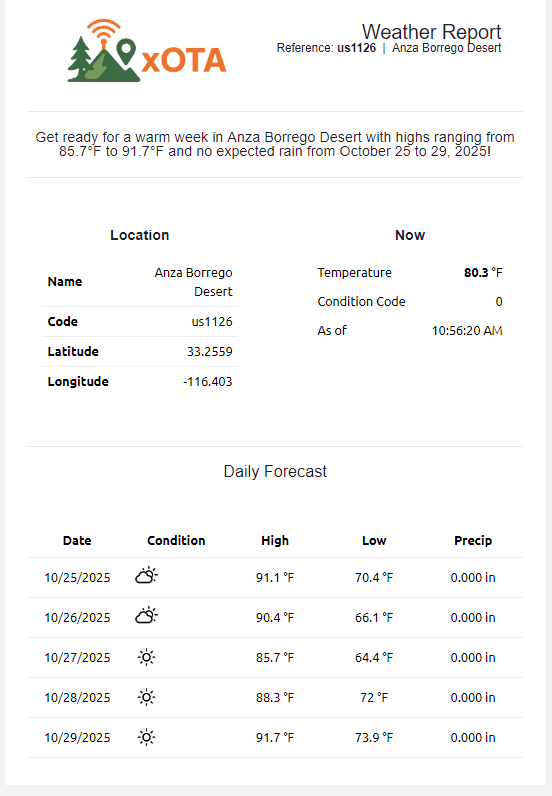
Standard emails are meant for no data restrictions, subsequently they are the more "traditional" of the report types. Below is an example of a weather report sent to a standard email with the command of wx@us1126
Simple formatted email report
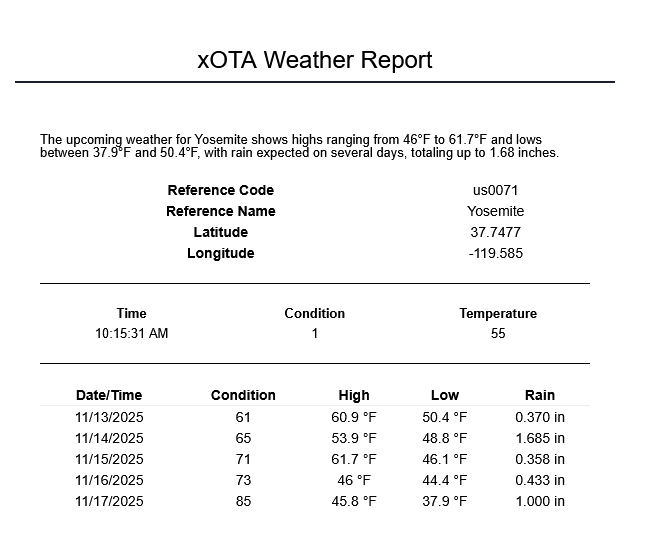
As a middle ground between a full email with images and styling, and a 140-character text string, you can also get basic reports over email with minimalistic styling and no images. These templates are great if working over a WinLink email, for example.
SMS / text-only email weather reports
Initially, when receiving an SMS weather report, it may seem somewhat cryptic; however, since the platform was intended to work with limited messaging devices, the syntax of the response was crafted to save much-needed character space. After learning the syntax, it will become quite clear.
An example of an xOTA weather report will be returned in the following format:
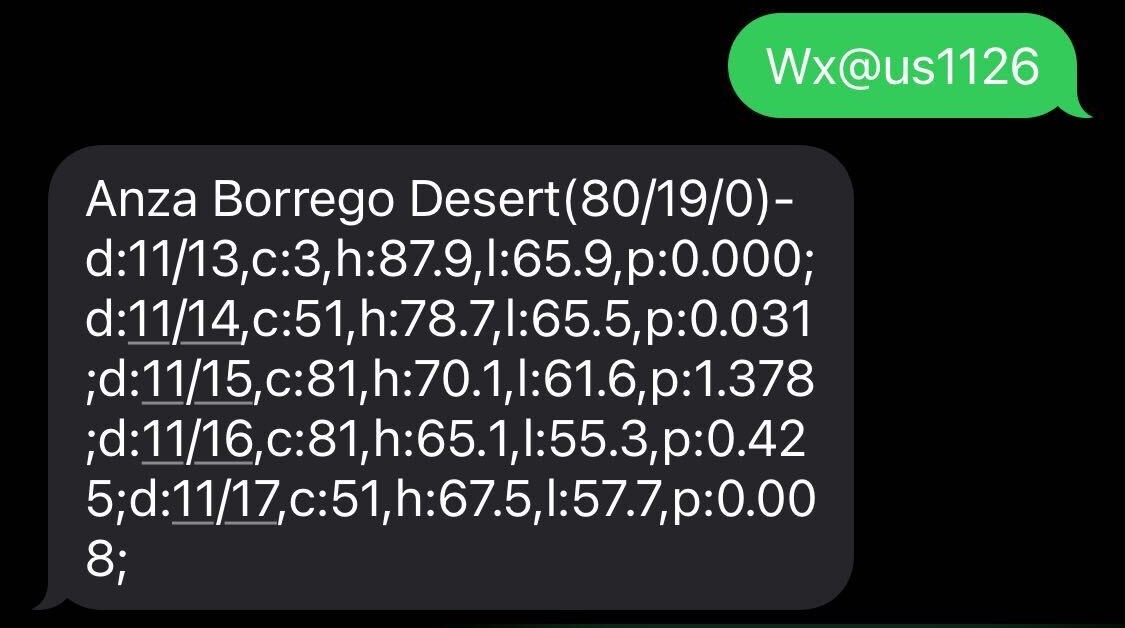
The report syntax can be broken down in the following method:
<reference/cords>(<current temp>/<current humidity>/<current code>-d:<date>,c:<condition>,h:<high>,l:<low>,p:<precipitation>;...
When after understanding this structure, the aforementioned weather report can be read as:
- Anza Borrego Desert
- Current Conditions:
- Temperature: 80°
- Humidity: 19%
- Condition: 0 (clear sky)
- Date: 11/13
- Condition: 3 (partly cloudy)
- High: 87.9°
- Low: 65.9°
- Precipitation: 0
- Date: 11/14
- Condition: 51 (Light/moderate drizzle)
- High: 78.7°
- Low: 65.5°
- Precipitation: 0.031
- Date: 11/15
- Condition: 81 (Rain showers)
- High: 70.1°
- Low: 61.6°
- Precipitation: 1.378
- Date: 11/16
- Condition: 81 (Rain showers)
- High: 65.1°
- Low: 55.3°
- Precipitation: 0.425
- Date: 11/17
- Condition: 51 (Light/moderate drizzle)
- High: 67.5°
- Low: 57.7°
- Precipitation: 0.008
- Current Conditions:
The same general syntax is for both daily (default) and hourly (optional parameter) report types.
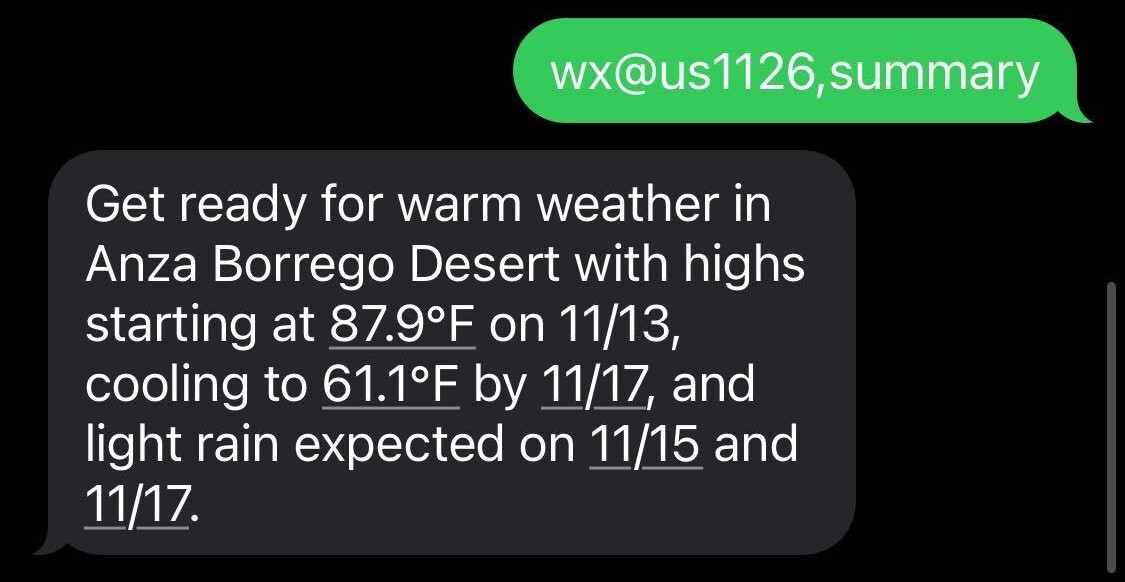
If you do not want to dissect the report syntax directly, you can add the optional summary parameter. This will take the report data and give you a brief summary of it's contents:
Weather Codes
All weather codes for reports are derived from the WMO Weather Interpretation Codes (WW). More info and specific codes can be found here: NOAA weather codes
A quick reference table for weather codes is provided below:
| Code | Description |
|---|---|
| 0 | Clear Sky |
| 1, 2, 3 | Mainly clear, partly cloudy, and overcast |
| 45, 48 | Fog and depositing rime fog |
| 51, 53, 55 | Drizzle: Light, moderate and dense intensity |
| 56, 57 | Freezing Drizzle: light and dense intensity |
| 61, 63, 65 | Rain: Slight, moderate and heavy intensity |
| 66, 67 | Freezing Rain: Light and heady intensity |
| 71, 73, 75 | Snow fall: Slight, moderate and heavy intensity |
| 77 | Snow grains |
| 80, 81, 82 | Rain showers: Slight, moderate and violent |
| 85, 86 | Snow showers: Slight and heavy |
| 95 | Thunderstorm: Slight or moderate |
| 96, 99 | Thunderstorm with slight and heavy hail |
Command parameters
hourly- Requests an hourly report for the next 5 hours
summary- Rather than provide the report directly, summarize it in natural language