Spotting
Overview
The inspiration and primary role of xOTA started with the ability to easily create a spot while operating off-grid. Subsequently, it's still the primary focus of the platform.
The general syntax for creating a new spot is:
spot@<location>,<mode>,<frequency (kHz)>,<comment (optional)>
To update one of your existing spots, the general syntax is:
update@<activity (POTA/SOTA)>,<frequency (optional)>,<mode(optional)>,<comment (optional>
Posting new spot
When posting a new spot, use the spot command followed by the required parameters in order:
- Park code / Summit Association & Code
- Mode
- Frequency (kHz)
Additionally, you may add your spot comment in as an optional last parameter
spot@us-1126,CW,14060,Calling cq
There is no need to submit the activity you're spotting for as xOTA will be able to understand the syntax and post the spot to the appropriate platform. If a SOTA spot was wanted, you would submit a message formatted as follows:
spot@W6/SC-323,SSB,14320,Calling CQ
Summit and park references require no symbols or special casing to be parsed correctly. Read more in "General Formatting"
When crafting a comment parameter, be sure not to use any disallowed symbols. This can result in incorrect data being posted, or more likely, a general error when attempting to post your spot. For a complete listing of all reserved characters, please reference the command syntax found here: Reserved Characters
Once your spot has been posted, you will receive a confirmation message back on the same platform informing of a successful spot.
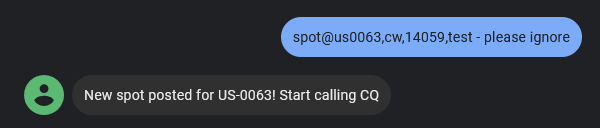
During the early access release of xOTA, only spotting to POTA or SOTA is supported. In the future, IOTA, FLOTA and DX will all be supported with the various spotting methods.
Updating existing spot
When updating an existing spot, the syntax is even easier. Send an update command, with the chosen fields you wish to update. When updating an existing spot, if any of the following fields are not provided, your existing spot's data will be used:
- Frequency
- Mode
- Reference
- Comment
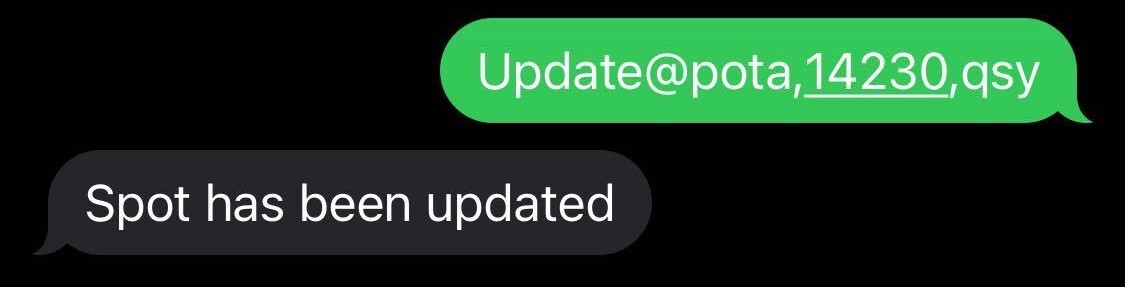
For example, if I needed to QSY to a different frequency, I would only need to send the following command:
update@pota,14230,qsy
Similarly to posting a new spot. You will receive a confirmation once your spot has been updated:
If you just wanted to post a new comment for yourself, without changing any of the original spot parameters, for example, you can send an update with only your comment specified:
update@pota,qrt - 73
Removing spot (SOTA only)
This feature is still under development. See the Blog Post for more details
Command Parameters
New Spot:
Location- Park code or summit association/code.
Mode- Any of the recognized radio operating modes (e.g. SSB, CW, FT8, etc.)
Frequency- The frequency in kHz you are operating on (band will automatically be determined).
Comment (optional)- Optional comment to post with your spot to the determined platform
Update Spot:
Activity- Activity for the spot to update, either POTA or SOTA.
Frequency (optional)- If you have changed frequency from your original posting, you can update it.
Mode (optional)- Alternatively, if you are in a different mode, you can also update it with a new spot.
Location (optional- If you have changed parks or summits, this parameter will post an update with your new location.
Comment (optional)- Optionally add a new comment associated with your updated spot.