SMS / Satellite
Overview
SMS messaging was the first communication method envisioned for interfacing with the platform, and as a result it remains the most feature-complete. The command syntax, status responses, and interaction flow are all designed around quick, concise use on a mobile or satellite messenger keyboard—particularly in environments where bandwidth, screen size, or signal quality may be limited.
Any SMS-capable device is compatible with xOTA, including:
- Traditional mobile phones
- Satellite messengers (e.g. iPhone Satellite, Spot, etc.)
- Cellular-connected IoT devices that can transmit SMS
If a device can send and receive SMS messages reliably, it is compatible.
Sending an SMS
xOTA has been provisioned the following toll-free phone number for all inbound and outbound SMS communications:
+1 (844) 763-9682
You should save this number to your contacts and/or whitelist it on your device or messaging service. All command requests must be sent to this number, and all platform responses will originate from it. This number is static and will not change.
Adding an SMS device
To add an SMS device navigate to Connected Devices from the main menu and select Add Device.
Upn selecting SMS you will see the interface shown below:
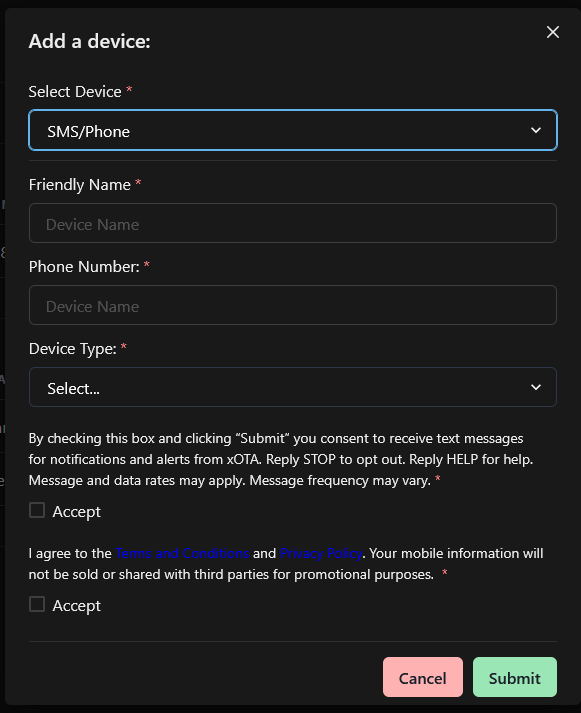
Once your device has been added, it will be put into a pending state until verification has been completed.
Friendly Name
Provide a name for your device.
This name will appear:
- In your account device list
- In activity and audit logs
- When setting up alerts, triggers or notifications involving this device.
Choose something descriptive - e.g. John's inReach, Field Phone, or Truck Modem
Phone Number
Currently only US-based SMS devices are supported. If sufficient demand exists, support for international numbers may be added in the future.
Enter the SMS-capable phone number in 10DLC format, prefixed by the country code. For example:
10123456789
This number must belong to the device that will be sending the communications.
Device Type
Choose the device type that best matches the hardware you’re registering.
Device types do not change functionality or permissions; they are purely organizational. They can help you distinguish between multiple devices—especially when managing multiple devices.
Terms and conditions
To comply with telecommunications and messaging regulations, all devices registered to the platform must accept and adhere to the associated Terms and Conditions
You will be prompted to review these terms during the device registration process.
Activating an SMS device
Once your device has been registered, you will receive a verification request as pictured below:
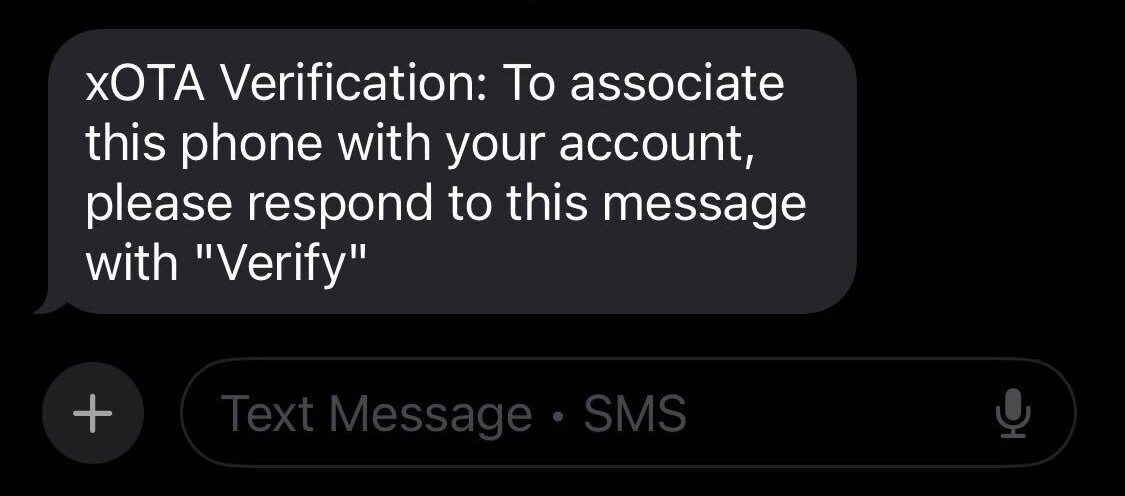
xOTA Verification: To associate tis phone with your account please respond with "Verify"
Simply reply to this message with verify. That’s all that’s required—once confirmed, you will receive a verification acknowledgment, and the device will be immediately ready for use with the xOTA platform.